
Unified User & Service Account Management (RBAC & Quotas)
Learn how to manage human users and service accounts in a unified console with full Role-Based Access Control (RBAC) and daily quota parity.
Overview
Google Threat Intelligence delivers Unified Identity Management, consolidating human user accounts, service accounts, and pending invitations into a single, centralized administration console.
With full Role-Based Access Control (RBAC) and Daily API cap parity, group administrators can now assign granular permissions and usage limits to machine-to-machine integrations and agentic workflows with the exact same precision as human identities.
Key Benefits:
- Consolidated Dashboard: Manage all organizational identities, roles, and daily allowance from a unified view under My group.
- Full RBAC Parity for Service Accounts: Eliminate all-or-nothing machine access by enforcing least-privilege access controls on automated scripts, CI/CD pipelines, and AI agents.
- Granular Daily Quota Allocation: Set explicit daily API request quotas per service account to prevent automated integrations from unexpectedly exhausting the organization's global group limits.
Prerequisites
To configure roles and quotas across users and service accounts, ensure the following requirements are met:
- You must hold Group Administrator (Admin) privileges within your Google Threat Intelligence enterprise group (
USER_ROLE_GROUP_ADMIN). - You need access to the web interface via My group -> Members, or an active Administrator API Key for programmatic management.
Defaults & Migration Behavior
When adopting unified identity management, note the default behavior for newly created and existing service accounts:
- Existing Service Accounts: Upon rollout of unified identity controls, previously existing service accounts retain their historical baseline access and have no custom daily quota cap (
api_requests_daily), consuming directly from the organization's global group allowance until an explicit restriction is configured. - Newly Created Service Accounts: New service accounts automatically inherit the baseline roles defined by the group administrator under My group -> ROLES. They start without an individual quota cap unless explicitly limited via the Daily API cap column or programmatic API v3
PATCHrequests.
Consolidated Identity Management
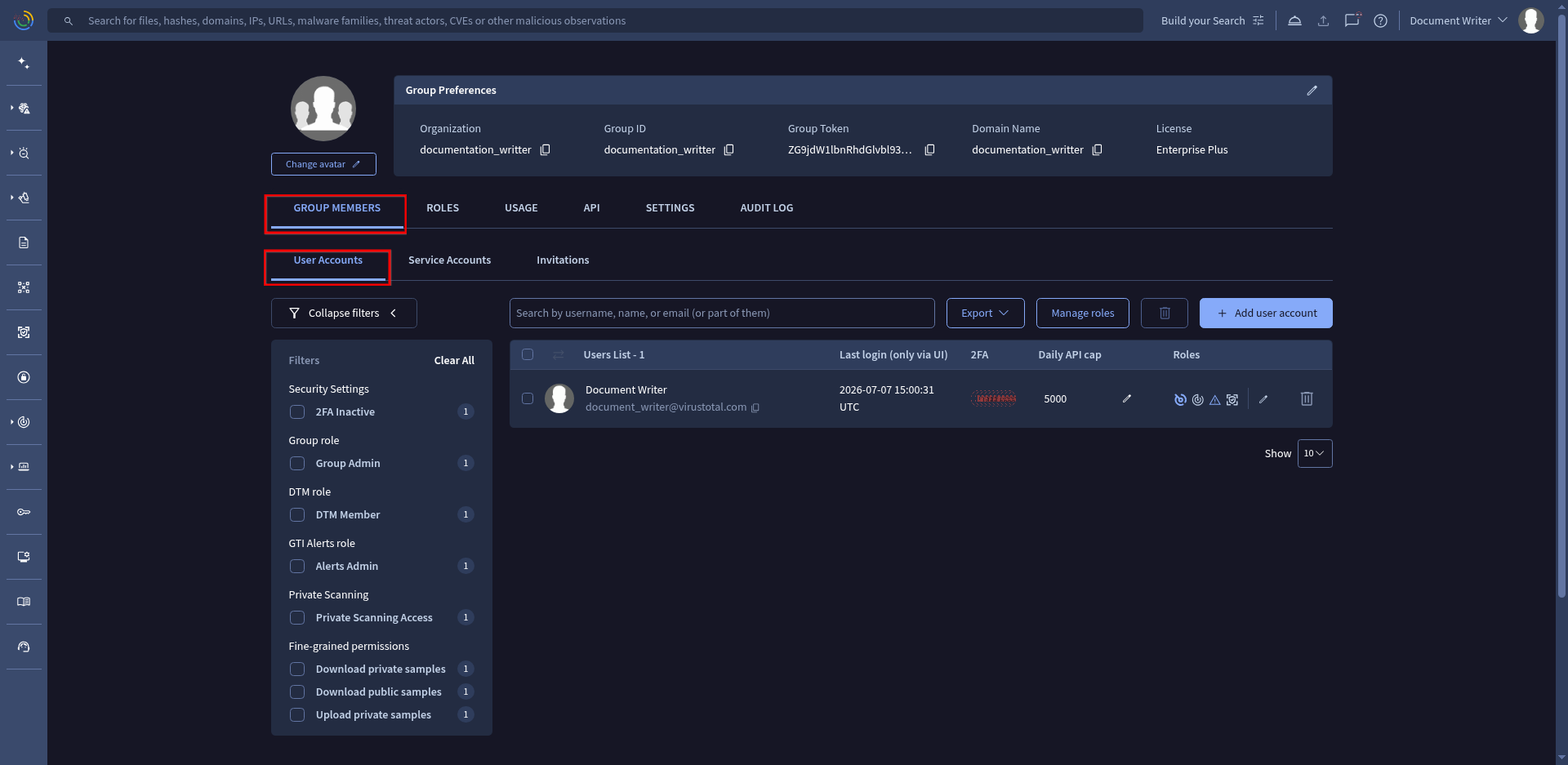
The administration dashboard brings all identities into unified sections under My group -> Members:
- Active Users: Human members currently onboarded to the platform.
- Service Accounts: Non-human identities designed for automation, API connectors, and semi-autonomous scripts.
- Pending Invitations: Track and manage sent onboarding requests.
Administrators can search, filter by role, and inspect individual identity attributes directly from this consolidated view.
Configuring RBAC Roles for Service Accounts
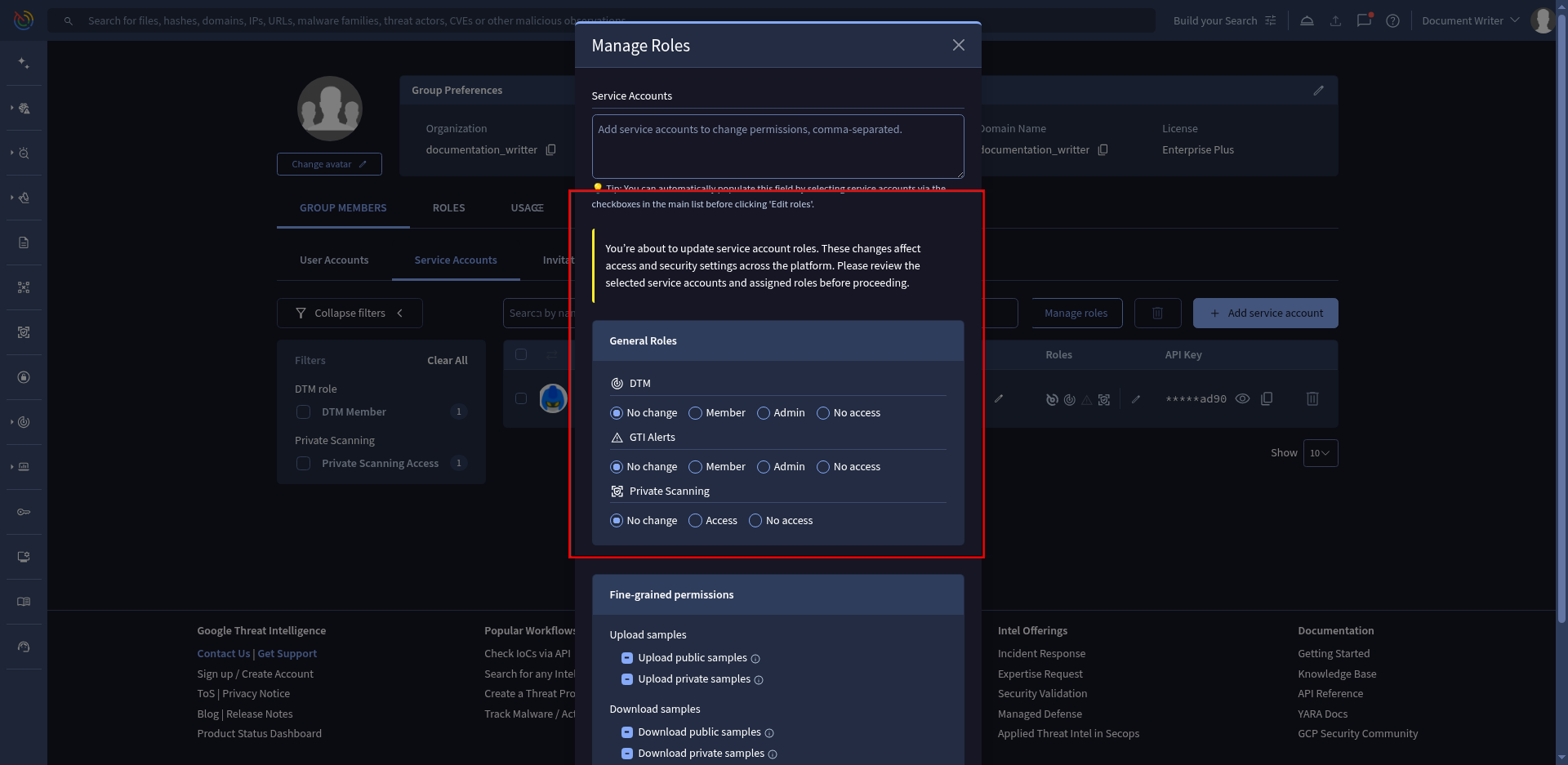
Service accounts can be assigned granular roles to restrict access to specific platform modules such as Threat Profiles, Private Scanning, or Livehunt.
Step-by-Step UI Configuration
- Navigate to the top-right menu and select My group.
- Click on the Members tab and select the Service accounts sub-section.
- Click on the edit icon (pen) in the Roles column for an individual service account, or select multiple accounts using checkboxes and click on the Manage Roles button at the top.
- Toggle the specific permissions required for the automated workflow and click Save.
Available RBAC Roles (USER_ROLE_* Enums)
USER_ROLE_* Enums)The complete set of RBAC role enums across all Google Threat Intelligence products includes:
| Role / Enum String | Description |
|---|---|
USER_ROLE_GROUP_ADMIN | Full administrative access to manage group users, settings, and quotas. |
USER_ROLE_DTM_ADMIN | Full administrative management over Digital Threat Monitoring assets and alerts. |
USER_ROLE_DTM_MEMBER | Standard read/write access to Digital Threat Monitoring alerts and brand mentions. |
USER_ROLE_ALERTS_ADMIN | Full management of My Landscape / Relevance System rules and alerts. |
USER_ROLE_ALERTS_MEMBER | Standard access to view and enrich Relevance System alerts in My Landscape. |
USER_ROLE_ASM_USER | Access Attack Surface Management (ASM) discoveries, assets, and issues. |
USER_ROLE_PRIVATE_SCANNING | Upload and scan files privately without sharing payloads or indexing publicly. |
USER_ROLE_FILE_DOWNLOADS | Download sample payloads from historical feeds and live hunts. |
USER_ROLE_FILE_UPLOADS | Submit standard files for public analysis and scanning. |
USER_ROLE_PRIVATE_FILE_UPLOADS | Submit files to private storage pools without public distribution. |
USER_ROLE_PRIVATE_FILE_DOWNLOADS | Download files exclusively from your organization's private storage pool. |
Where to check your active roles: The exact subset of roles available to your organization depends on your active license. You can verify your enabled roles in the ROLES tab under My group in the web console (/gui/group/roles), or programmatically query GET /v3/groups/{id}/relationships/service_accounts on an existing service account to inspect active roles strings.
Note: Ensure service accounts are assigned only the minimum roles required for their task to maintain enterprise governance standards.
Managing Daily API Quotas
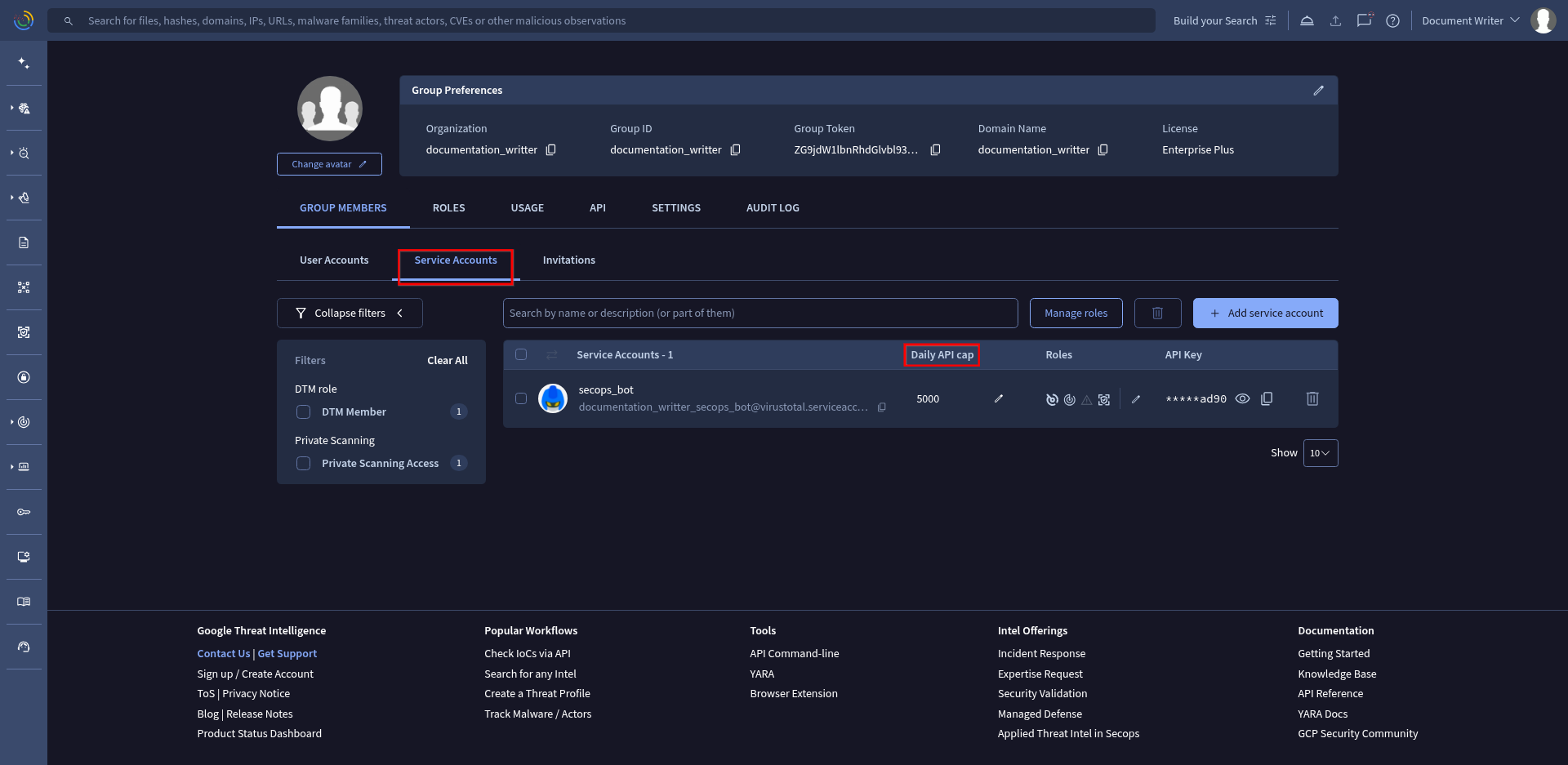
To prevent noisy scripts or misconfigured automated agents from consuming the entire group's daily allowance, administrators can enforce hard daily quota caps per service account.
Setting Quotas via Console
- In the Service accounts section under the Members tab, locate the target service account.
- Click on the edit icon (pen) in the Daily API cap column.
- In the text box, specify the exact number of daily API requests (
api_requests_daily) allowed for this service account (or leave blank for unlimited within group bounds). - Click Save to apply the daily quota enforcement instantly.
Programmatic Management via API v3
Group administrators can automate RBAC role assignments and daily quota management for service accounts using the Google Threat Intelligence API v3 endpoint: /v3/groups/{id}/relationships/service_accounts.
Important Note on Service Account IDs:
When managing service accounts via API, {service_account_id} always includes your group ID prefix concatenated with the account identifier, separated by an underscore ({group_id}_{account_name}, e.g., my_group_id_secops_bot).
Patching Service Account Roles (cURL)
To modify or assign RBAC roles to a service account within your group, send a PATCH request with exact role enum strings inside context_attributes:
curl --request PATCH \
  --url 'https://www.virustotal.com/api/v3/groups/{group_id}/relationships/service_accounts' \
  --header 'x-apikey: <YOUR_ADMIN_API_KEY>' \
  --header 'content-type: application/json' \
  --data '{
    "data": [
      {
        "type": "service_account",
        "id": "{group_id}_{account_name}",
        "context_attributes": {
          "roles": [
            "USER_ROLE_DTM_MEMBER",
            "USER_ROLE_PRIVATE_SCANNING",
            "USER_ROLE_FILE_DOWNLOADS"
          ]
        }
      }
    ]
  }'
Updating Service Account Daily Quota Allocation (Python)
To enforce a daily API request allowance (api_requests_daily) on a specific service account:
import requests

group_id = "my_group_id"
service_account_id = f"{group_id}_secops_bot"
api_key = "YOUR_ADMIN_API_KEY"

url = f"https://www.virustotal.com/api/v3/groups/{group_id}/relationships/service_accounts"
headers = {
    "x-apikey": api_key,
    "content-type": "application/json"
}
payload = {
    "data": [
        {
            "type": "service_account",
            "id": service_account_id,
            "context_attributes": {
                "quota_limits": {
                    "api_requests_daily": {"allowed": 5000}
                }
            }
        }
    ]
}

response = requests.patch(url, json=payload, headers=headers)
print("Status Code:", response.status_code)
print("Response JSON:", response.json())
Expected Responses and Error Handling
Successful Update (HTTP 200 OK)
HTTP 200 OK)When the roles or quota limits are successfully modified, the API returns HTTP 200 OK with an empty response body ({}):
{}Common Error Codes
HTTP 400 Bad Request(Invalid Role Enum): Returned if an unrecognized role string is passed in therolesarray. Ensure all role strings match valid enums enabled by your organization's license.HTTP 403 Forbidden(Insufficient Privileges): Returned if thex-apikeyheader belongs to a standard group user (USER_ROLE_DTM_MEMBER) rather than a Group Administrator (USER_ROLE_GROUP_ADMIN).HTTP 404 Not Found(Unknown Service Account ID): Returned if theidprovided does not match an existing service account in the group. Verify that the ID is formatted correctly as{group_id}_{account_name}.
Governance & Best Practices
- Separate Service Accounts per Workflow: Do not share a single service account across multiple applications. Create dedicated identities (e.g.,
siem-connector,soar-automation,daily-hunting-agent) for complete auditability. - Audit Logs: Monitor API consumption patterns regularly under My group -> Quota Consumption to detect abnormal spikes or quota bottlenecks early.
- Regular Rotation: Rotate API keys for service accounts periodically (
get-service-accounts-of-a-group) or upon team member transitions.
Updated 3 months ago